Export files downloads a zip of the files in a session, together with what Hoppa derived from them. If you have generated file codes with Rename, each file in the zip is named by its code.
Uploaded files only
The zip only contains files that were uploaded directly to Hoppa, with File / folder upload. Files connected from a source system, such as SharePoint or Autodesk, are not downloaded from that system. To update those files where they are, use Write back to source.
Before you start
You need to be an Admin, Manager or Member to export files.
Export the files
- Open the session's results.
- Optionally, select Rename to generate file codes. See Rename files.
- Open the menu next to Export and select Export files.
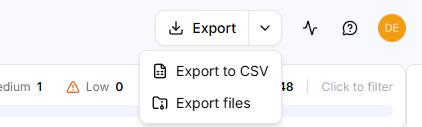
Export menu with Export to CSV and Export files
Hoppa shows Zipping files for download..., then Download started. The zip is named after the session ID.
What is in the zip
- Each uploaded file, named by its file code if you used Rename, or by its original name otherwise.
- Derived files, such as extracted metadata and thumbnail images.
Tip
Generate file codes and export in the same visit. File codes are not saved with the session, so they are lost if you refresh or leave the Results page.