A workspace groups related sessions and holds the information standard and workflow they start from. Create one for each project, client or kind of document you work with. See Organisations, workspaces and sessions.
Before you start
You need to be an Admin or Manager to create a workspace. If Create workspace is greyed out, ask your organisation's admin. See Roles and permissions.
Create the workspace
- On your organisation's landing page, select Create workspace.
- Enter a Workspace name. This is the name people see on the workspace card and in breadcrumbs.
- Check the Workspace ID. Hoppa fills it in from the name, and it forms part of the workspace's web address. You can change it, using only lowercase letters, numbers and hyphens. It cannot start or end with a hyphen, and it must not match an existing workspace.
- Under Blueprint, choose how to start the standard:
- Start from scratch to build your own standard.
- A blueprint to start from a ready-made classification system. See Blueprints.
- Select Create workspace.
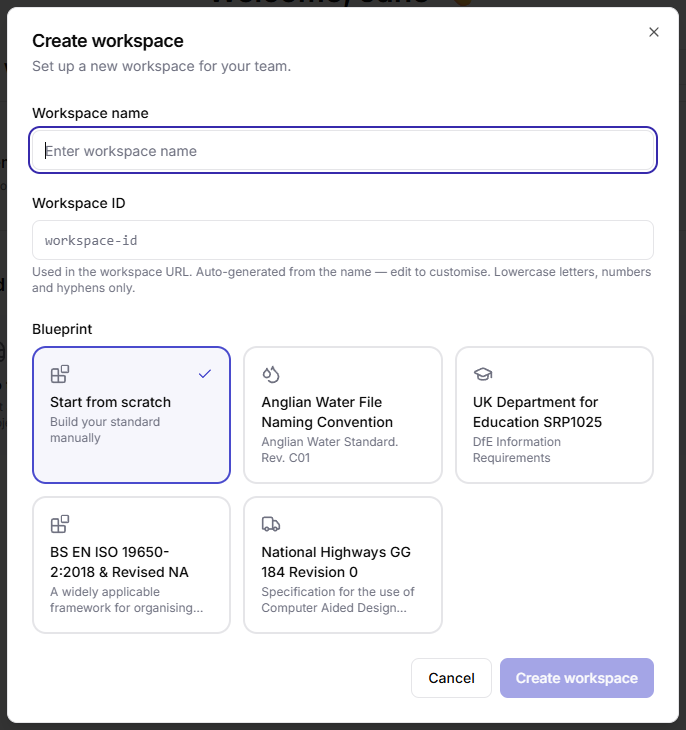
Create workspace dialog with name, ID and blueprint options
Hoppa creates the workspace and opens it on the Sessions tab.
Warning
Choose the Workspace ID carefully. It appears in every link to the workspace and its sessions.
Blueprints
A blueprint fills the new workspace's standard with the classifications from a published information standard, so you do not have to type them in. The blueprints currently available are:
| Blueprint | Based on |
|---|---|
| Anglian Water File Naming Convention | Anglian Water Standard, Rev. C01 |
| UK Department for Education SRP1025 | DfE Information Requirements |
| BS EN ISO 19650-2:2018 & Revised NA | The ISO 19650 framework for organising information, with the UK National Annex |
| National Highways GG 184 Revision 0 | National Highways' specification for the use of Computer Aided Design |
More blueprints are being added. If you need one for a standard that is not listed, raise a ticket through the support portal.
After creating the workspace, you can change anything the blueprint added. A blueprint provides classifications only, so add any search fields and tags you need yourself.