A workflow is the sequence of processing steps Hoppa runs on each document in a session. It extracts content, runs the AI analysis against your standard and stores the results. Every workspace and session has one, and most people never need to change it.
A super-user feature
Reading the workflow can help you understand how results are produced. Editing it is an advanced task. For anything beyond the basics on this page, see the Workbench Docs.
Viewing the workflow
Open the Workflow tab in a workspace's Refinery, or in a session's Data Refinery. Hoppa draws the workflow as a diagram, read from left to right. Each card is a step, and the coloured label at the top of the card names the stage it belongs to. Steps in the same stage share a colour.
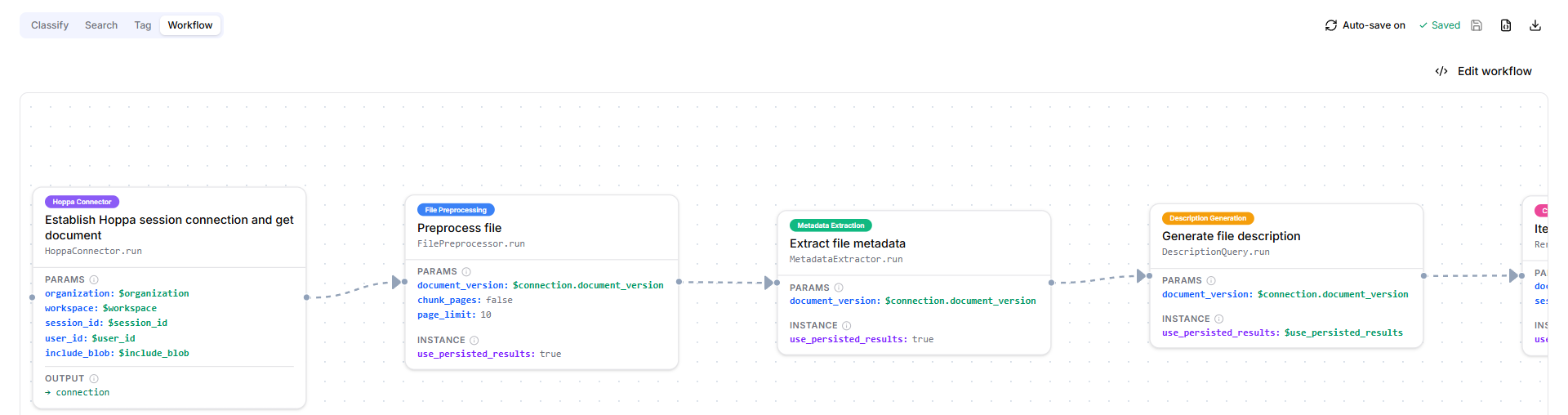
Workflow diagram with step cards labelled by stage
Stages and steps
A workflow is made of stages, and each stage contains one or more steps.
- Stages run in order. Each stage finishes before the next one starts.
- Steps within a stage can run side by side. A step that needs another step's result must wait for it, or sit in a later stage.
Each step runs one processing operation, such as extracting text from a file, describing it, or classifying it against your standard. The diagram shows these details for each step:
| Label | What it means |
|---|---|
| Template | An expression evaluated when the step runs, used to read data, transform it or write results. |
| Params | The arguments passed to the step when it runs. |
| Instance | The settings used to set up the processor before it runs. |
| Output | The name the step's result is stored under, so later steps can use it. |
| Retries | How many times the step is retried if it fails. |
| On failure | What happens if the step still fails. fail stops the workflow; otherwise the workflow carries on. |
Types of processing
The steps in a workflow use processors from Hoppa Workbench. The main kinds are:
- Extractors open files and pull out their content and embedded metadata.
- Transformers convert files from one format to another, such as turning PDF pages into images.
- Generators use generative AI to create new data, such as a description of a document.
- Classifiers assign codes and tags from your standard.
- Searchers find specific values, such as dates, references and amounts.
The Workbench processors guide describes each kind in more detail.
Workspace and session workflows
A session follows its workspace's workflow, and changes to the workspace workflow reach the session. Editing the session's own workflow breaks that link permanently. To relink it, raise a ticket through the support portal.
See How standards and workflows pass from workspace to session.
Learn more
- Workflows overview explains what a workflow is in Workbench.
- Workflow definition language documents every stage and step setting.
- Metadata mappings covers mapping source metadata into your standard.
- View the workflow shows how to open and read the diagram in the app.